Rev. 2026-??-??
- TODO: Planned revisions to Open-Drain/Pull-Up notes related to capacitance based on something my friend pointed out.
Rev. 2026-??-??
- TODO: Planned some changes thanks to feedback.
Init. 2026-05-14
- I rewrote this like 3 times over the course of 7 days and spent way too long on these diagrams so hopefully this is up to snuff.
I2C
- Stands for Inter-Integrated Circuit and abbreviated as I2C or just I2C.
- It is a synchronous, two-wire serial communication bus used to connect low-speed peripherals over short distances.
SDA
- Stands for
SerialDAta. - Transfers data bidirectionally between devices.
SCL
- Stands for
SerialCLock. - Carries the clock signal to synchronize all data transfers.
Topology
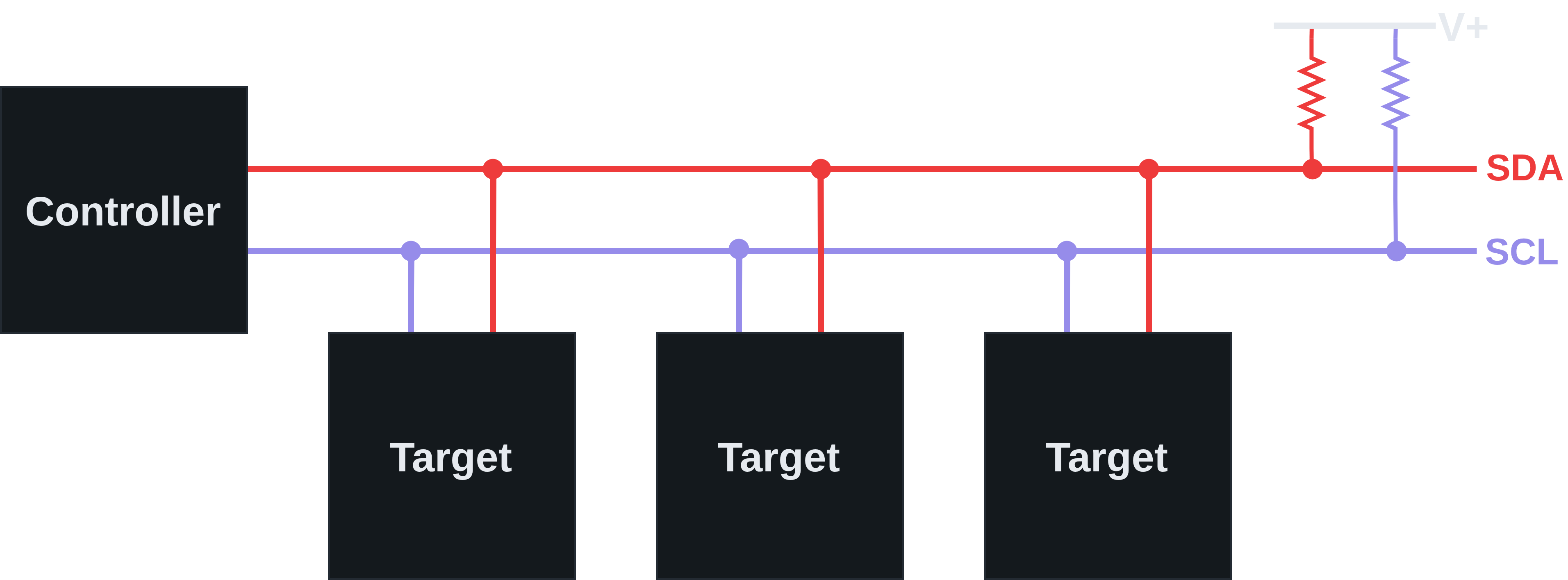
- There is always at least one controller and one target.
- Commonly there is a single controller and one or more targets.
- Uncommonly, there can be multiple controllers (multi-controller).
- The targets can be connected at any point on the lines.
- Each line is connected to its own pull up resistor which connects to the same positive voltage.
Open-Drain
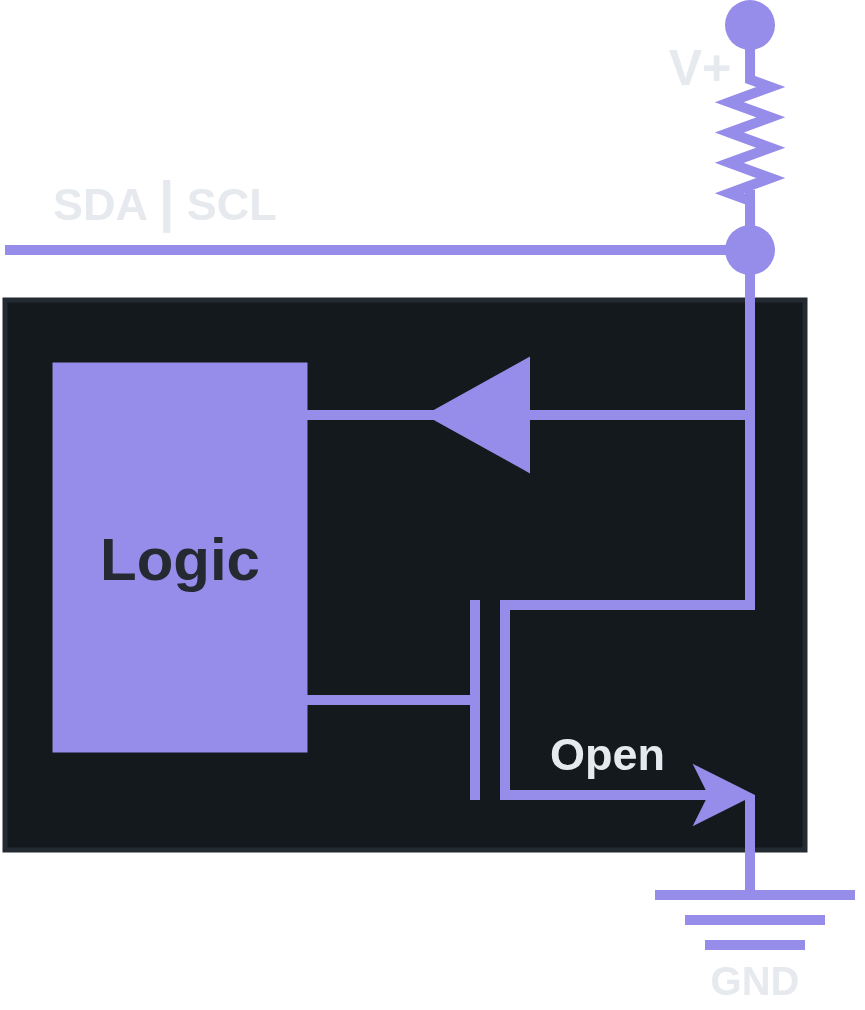
- In I2C,
SDAandSCLare idle-HIGH, meaning they areHIGHby default. As a result, I2C is considered an “Open-Drain” system.- When the drain is closed,
SDAandSCLare pulledLOW(connected to ground). - When the drain is open,
SDAandSCLreturn toHIGH(connected to positive voltage).
- When the drain is closed,
Bus Arbitration
- I2C can support multiple controllers on the same bus. The way to resolve this falls out naturally from the open-drain design.
Wired-AND Logic
- On an open-drain bus, driving
LOWis an active action (pulling the line to ground), while drivingHIGHis a passive release (letting the pull-up resistor return the line to positive voltage). - If one device pulls
LOWwhile another releases toHIGH, the line goesLOW. That is:- Pulling always overrides releasing.
- The bus is therefore logically equivalent to AND-ing every device’s output. This property is called “Wired-AND Logic”, and it is the electrical foundation that makes arbitration possible.
Resolution
- Every transmitting controller is required to monitor
SDAwhile it transmits. - On each bit, the controller compares what it tried to send against what actually appears on the
SDAline.- If they match then there is no conflict and the controller continues to transmit.
- If the controller tried to send
HIGHbut reads backLOW, another controller is pullingLOW, meaning this controller has lost arbitration and stops driving the bus, waiting for the next “Stop Condition” before attempting to claim the bus again.
- The winning controller never knows a conflict occurred. It sees its own bit on the line and continues transmitting its transaction uncorrupted.
- In conclusion, open-drain makes arbitration a passive consequence of the electrical design rather than an active protocol feature.
Both controllers successfully claim the bus by pulling
SDALOWduring the “Start Condition”. The conflict is resolved during the address transmission that immediately follows. As both controllers clock out their target addresses bit-by-bit, the first bit where they disagree is where arbitration is decided:
- The controller that tries to send
HIGHwhile the other sendsLOWdetects the mismatch and backs off. The winning controller continues transmitting, unaware that arbitration even happened.And what if the controllers transmit identical bits throughout the entire transaction?
- Neither one detects a conflict!
- Both see the bus matching what they sent on every bit, both believe they own the bus, and both complete their transactions successfully!
The spec actually calls this out (UM10204 §3.1.8):
- “Two controllers can actually complete an entire transaction without error, as long as the transmissions are identical.”
- This isn’t a bug, it’s a deliberate feature of the design. The target still receives one coherent transaction, the fact that two controllers were driving the bus is invisible and harmless because their signals to the target were identical.
- For other reasons I won’t get into, the spec instructs that multi-controller systems should design their software protocol to avoid identical-transmission scenarios where possible, or accept that identical transactions are harmless duplicates.
This becomes more clear as we explore these concepts later, so if this doesn’t make sense yet, come back and re-read this after you finish up!
Pull-Up
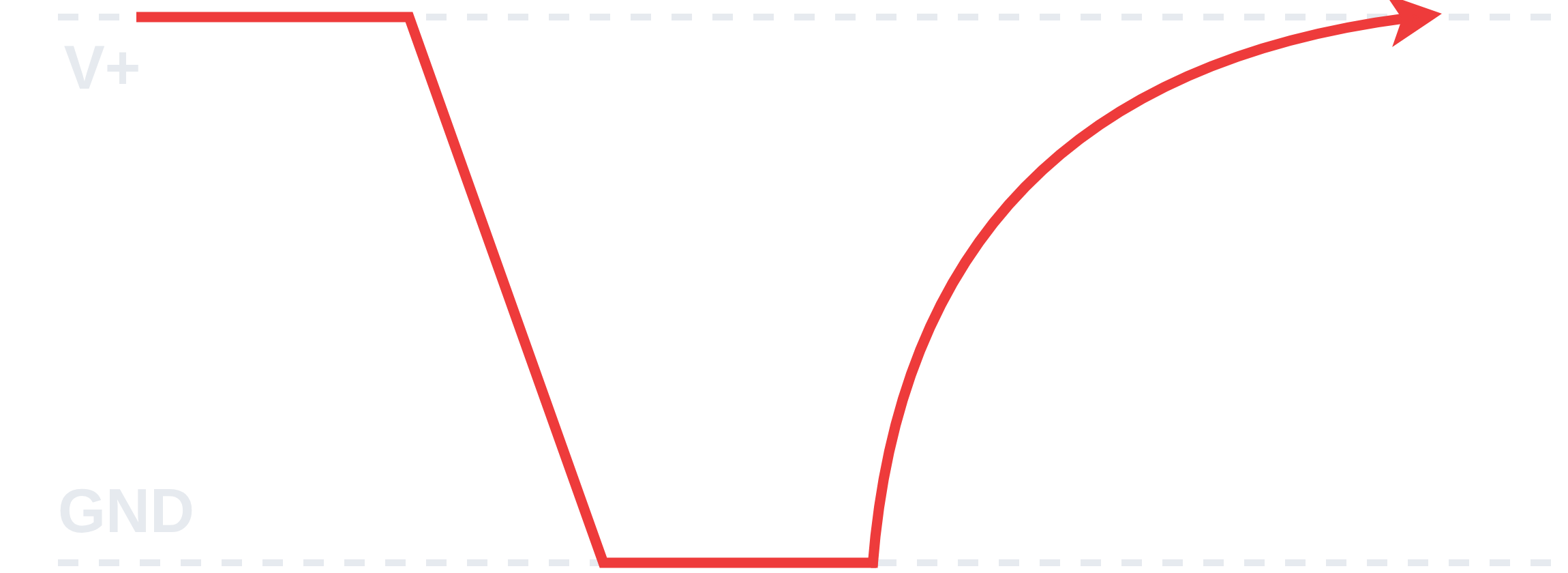
- Pulling down a line is usually much faster than pulling up a line.
- Pull up time is a function of bus capacitance and values of the pull up resistors.
- Typical values for these resistors is 1-10 kΩ. Pull up resistors are a compromise:
- High resistances increase the time needed to pull up the line and thus limits max bus speed.
- Lower resistances allow faster communications but require higher power.
Roles
- In I2C there are roles that don’t change that I’m referring to as “Fixed Roles”.
- Fixed roles describe who controls the bus.
- There are also roles that do change depending on the type of transaction (Read/Write) which I’m referring to as “Transactional Roles”.
- Transactional roles describe who is talking and who is listening during a transaction.
- A controller is always a controller and a target is always a target, but they may be a sender or a receiver depending on the direction of the current transaction (Read/Write).
Fixed Roles
- These are determined by the hardware/software design and don’t change during a transaction.
Controller
- The controller is the device that “owns” the bus during an I2C transaction.
- Controls when a transaction starts (
STARTCondition) and stops (STOPCondition). - Decides whether a transaction is a “Read” or “Write”.
- Drives the clock line
SCL. - Chooses which target will participate in the transaction.
Note that this was originally called “Master” and is still referred to as such in many explanations and libraries. There is an effort to change it to “Controller” going forwards which is what I opted to use.
Target
- The target is a passive participant of sorts, it never initiates anything.
- Constantly listens for its address to participate in a transaction initiated by the controller.
- Only acts when addressed by the controller.
- Never touches the clock line
SCLexcept to perform Clock Stretching sometimes.
Note that this was originally called “Slave” and is still referred to as such in many explanations and libraries. There is an effort to change it to “Target” going forwards which is what I opted to use.
Transactional Roles
- These are roles that either the controller or target can take on during a transaction depending on whether the transaction is a “Read” or “Write”.
Sender
- Whoever is driving the data line
SDAwith actual data. - The sender is:
READ: TargetWRITE: Controller
Receiver
- Whoever is reading the data line
SDA. - The receiver is:
READ: ControllerWRITE: Target
R/W Bit
- This is a bit set by the controller during the transaction that decides whether a “Read” or “Write” is being performed and as a consequence, what the transactional roles will be (who is the sender and who is the receiver).
READ: 1- Controller wants to receive data from the target.
WRITE: 0- Controller wants to send data to the target.
Read
- Controller
READ:- Sender: Target
- Receiver: Controller
Note that during a controller
READ, the controller still has its fixed role (controlsSCL, initiated the transaction) but has taken on the transactional role of receiver while the target ownsSDAas the sender.
Write
- Controller
WRITE:- Sender: Controller
- Receiver: Target
ACK/NACK Bit
- This is the “handshake” bit after every byte of data in a transaction.
- During data transmission specifically, the
ACK/NACKbit is always set by the receiver of the transaction, which can be the controller or the target. - During target selection which precedes any data transmission, the
ACK/NACKbit is always set by the target, regardless of whether it is a “Read” or “Write” transaction or if the target is a sender or receiver.
ACK
- Stands for
ACKnowledge. - Pulled
LOWto 0, which is an active operation in an open-drain system.
NACK
- Stands for
NegativeACKnowledge. - Released
HIGHto 1, which is a passive operation or “no-op” in an open-drain system.
Read
- During a “Read” transaction, the controller is receiver and sets the
ACK/NACKbit during data transmission. - The
NACKbit does not represent an error when it is set by the controller (which only occurs during a “Read”). - In this case, the
NACKtells the sender (target in this case), to stop sending data to the controller.
Write
- During a “Write” transaction, the target is the receiver and sets the
ACK/NACKbit during data transmission. - The
NACKbit, when set by the target during target selection or data transmission, means something went wrong.
Signaling
- All devices on the I2C bus continuously monitor
SDAandSCL. - Every device needs to know when transactions begin and end so they can participate appropriately.
Data Validity
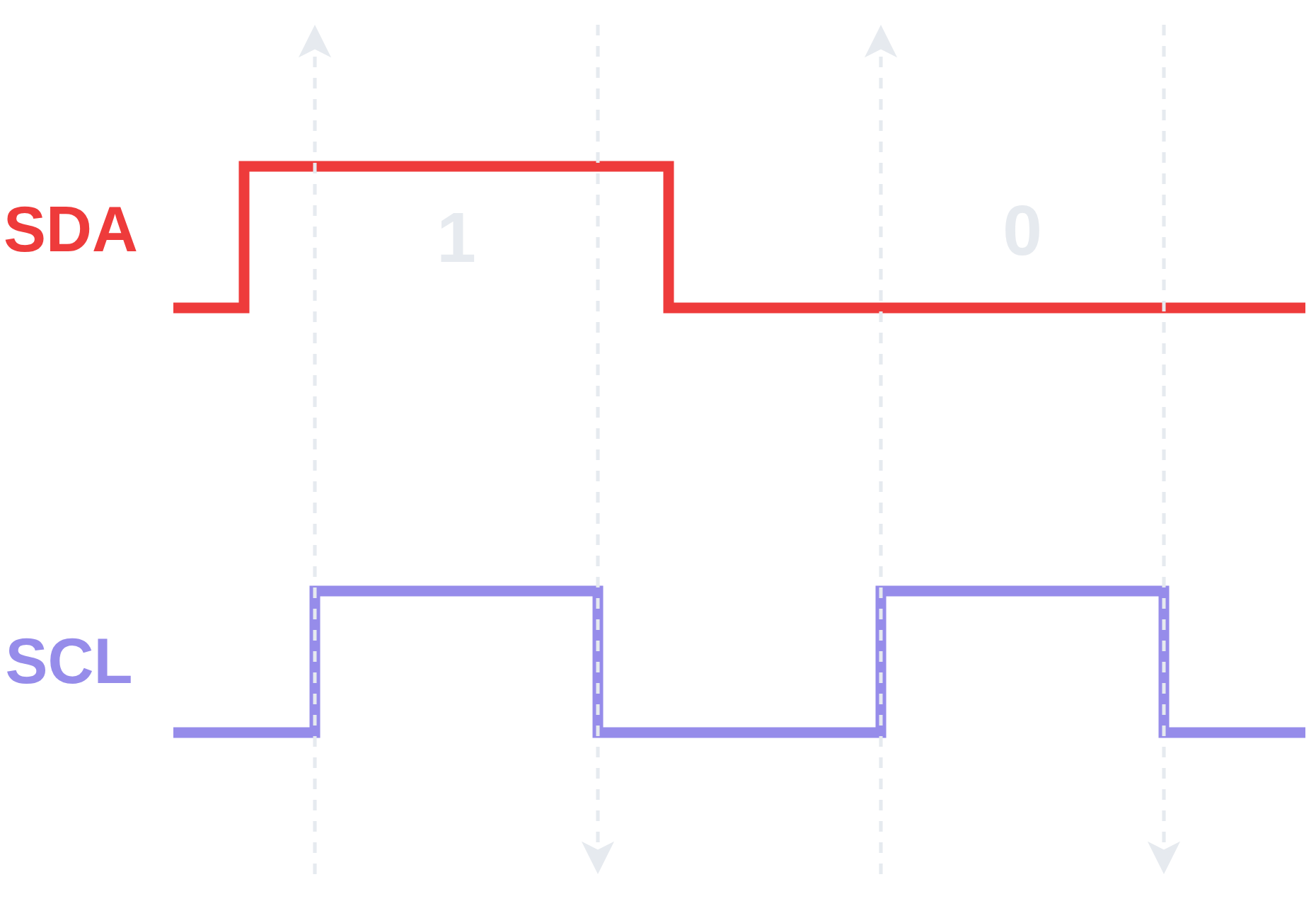
- “Data Validity” is the rule that governs data bit transmission.
- The I2C specification defines “Data Validity” as:
- The data on the
SDAline must be stable during theHIGHperiod of the clock. TheHIGHorLOWstate of the data lineSDAcan only change when the clock signal on theSCLline isLOW.
- The data on the
Conditions
- The “Data Validity” rule is able to create the signaling space for two special
STARTandSTOPconditions to exist. - These conditions deliberately violate the “Data Validity” rule in order to unambiguously signal the
STARTandSTOPof an I2C transaction. - The
STARTandSTOPconditions areSDAtransitions that occur whileSDAisHIGH. - When a device detects an
SDAtransition duringSCLHIGH, it knows this cannot be a data bit and interprets it as:START(ifSDAfell)STOP(ifSDArose)
Start Condition
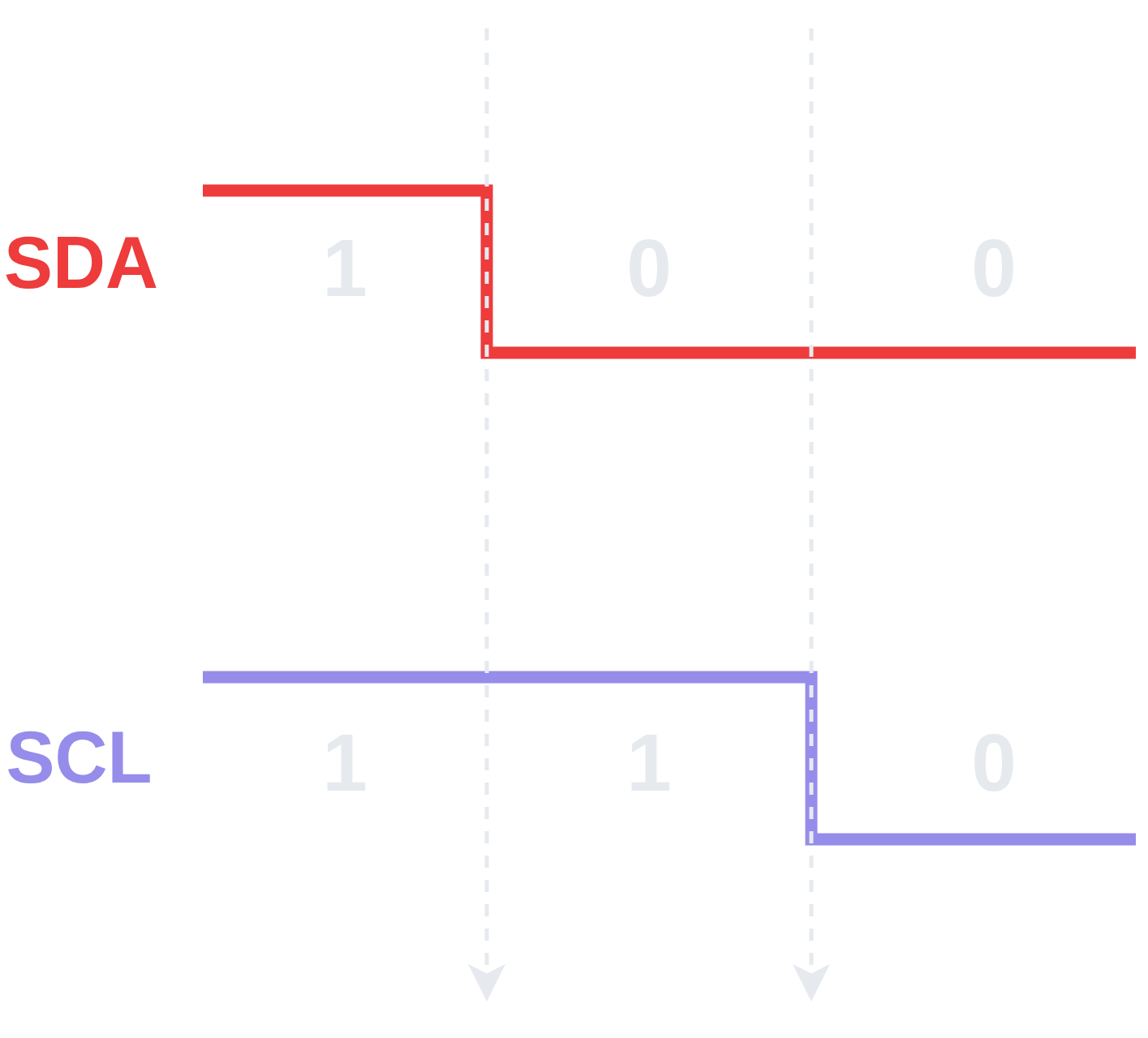
- The “
STARTCondition” occurs whenSDAis pulled low whenSCLis stillHIGH. - After the “
STARTCondition” occurs,SCLis pulledLOWand the transaction begins.
Stop Condition
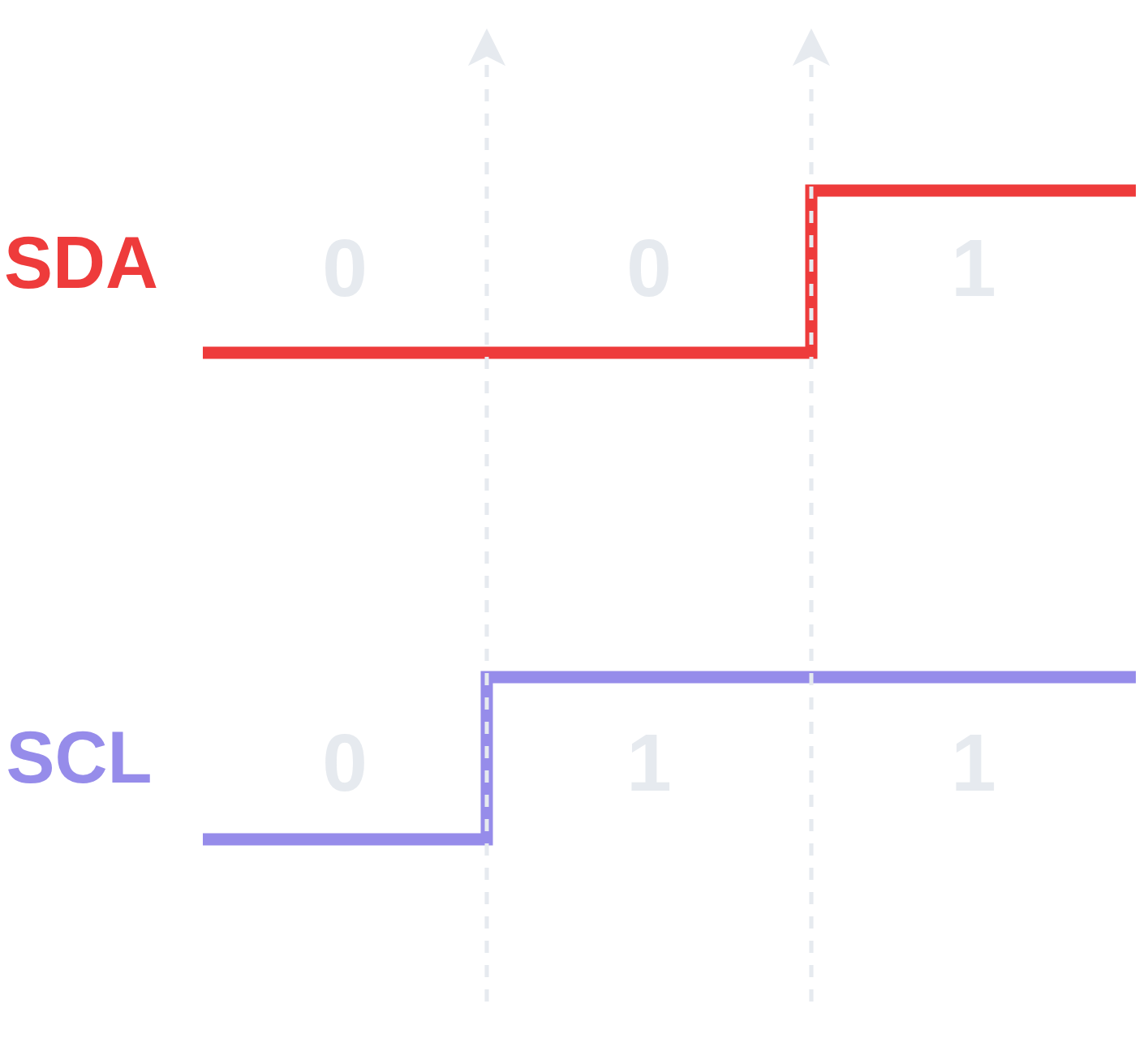
- The “
STOPCondition” occurs whenSDAis released toHIGHwhenSCLis alsoHIGH. - After the “
STOPCondition” occurs, the transaction is complete and the I2C bus is free to be claimed.
Clock Stretching
- “Clock Stretching” is a mechanism that allows a target device to pause an I2C transaction by holding
SCLLOW. - Normally the controller is in control of the clock
SCL, it drives and the target responds. - Because both lines are open-drain, a target can hold
SCLLOWto pause the controller.- If the controller goes to release
SCLto high to start the next clock pulse, but the target is holding itLOW, thenSCLstays low. - The controller is designed to check whether
SCLactually wentHIGHbefore proceeding, if it sees thatSCLdid not goHIGH, it waits. - The target holds
SCLLOWfor as long as it needs and then releases it toHIGH, allowing the transaction to proceed as usual.
- If the controller goes to release
- Target may use “Clock Stretching” when it needs additional time to process or prepare data.
Note that not all I2C controllers support clock stretching. Using a target that stretches the clock can cause issues when the controller doesn’t support it.
Frame
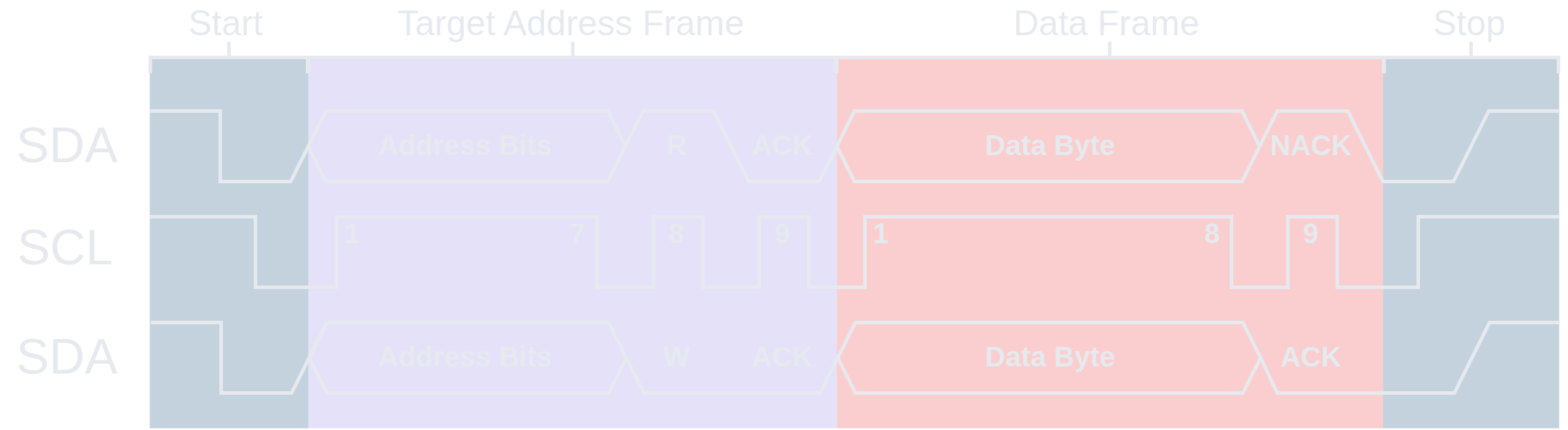
- A “Frame” can be defined as the basic unit of transmission in the I2C protocol, always comprised of 9 bits where the last bit is an
ACK/NACKbit. - The term “Frame” isn’t really “official” or used by the I2C spec, but is often used when making sense of I2C and talking about it.
- There are two kinds of frames that, while both being comprised of 9 bits, have slightly different anatomy for the 1st byte of the frame:
- Target Address Frame
- Data Frame
Target Address Frame
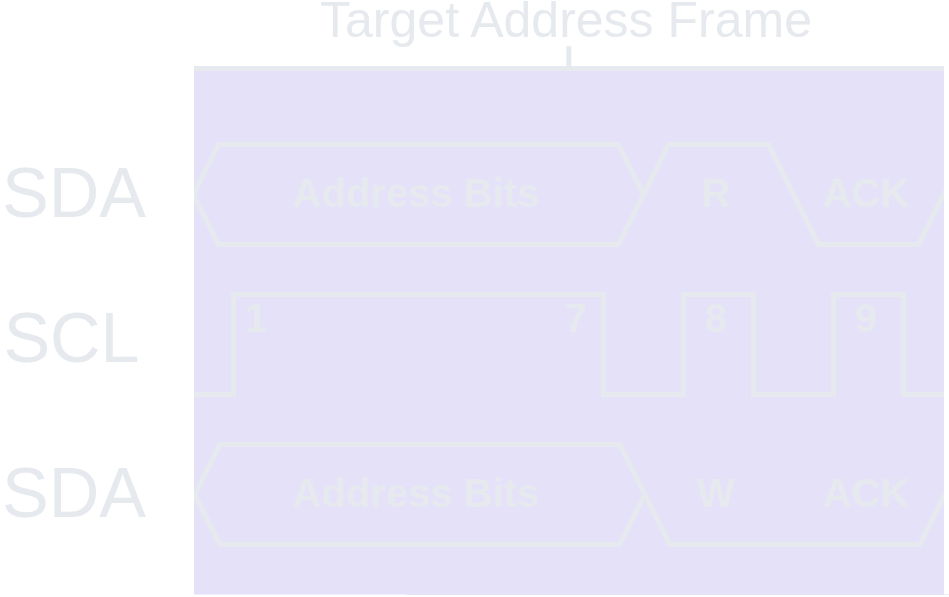
- The “Target Address Frame” is always the first frame to appear in any I2C transaction.
- It determines which target will participate in the transaction and what kind of transaction will occur (Read/Write).
Target Address
- The first 7 bits of the “Target Address Frame” is the “Target Address”.
- Each target on I2C must have a fixed address.
- Addresses are normally 7 bits long (less commonly, 10 bits) with MSB (Most Significant Bit) first.
- Addresses are hardcoded for devices and may be (partially) configurable via external address lines or jumpers.
- For example, the MPU-6050 has a default I2C address of
0x68, but can be configured to0x69by soldering the jumper on the device. - This can be useful and desirable for providing unique addresses if you want multiple of the same device on an I2C bus in order to distinguish them as two distinct targets.
- For example, the MPU-6050 has a default I2C address of
- Because addresses are 7 bits, the range for these addresses is 128 unique addresses from
0x00to0x7F.- In reality a handful of these are reserved by the I2C specification.
R/W Bit
- The 8th bit in the “Target Address Frame” is the “R/W Bit”.
- An I2C transaction can either be a “Read” or “Write”. This is decided by setting the “R/W Bit”.
READ: 1 (releasedHIGH)WRITE: 0 (pulledLOW)
ACK/NACK Bit
- The 9th (last) bit in the “Target Address Frame” is the “
ACK/NACKBit”. - The
ACK/NACKin the “Target Address Frame” is always set by the target.
Data Frame
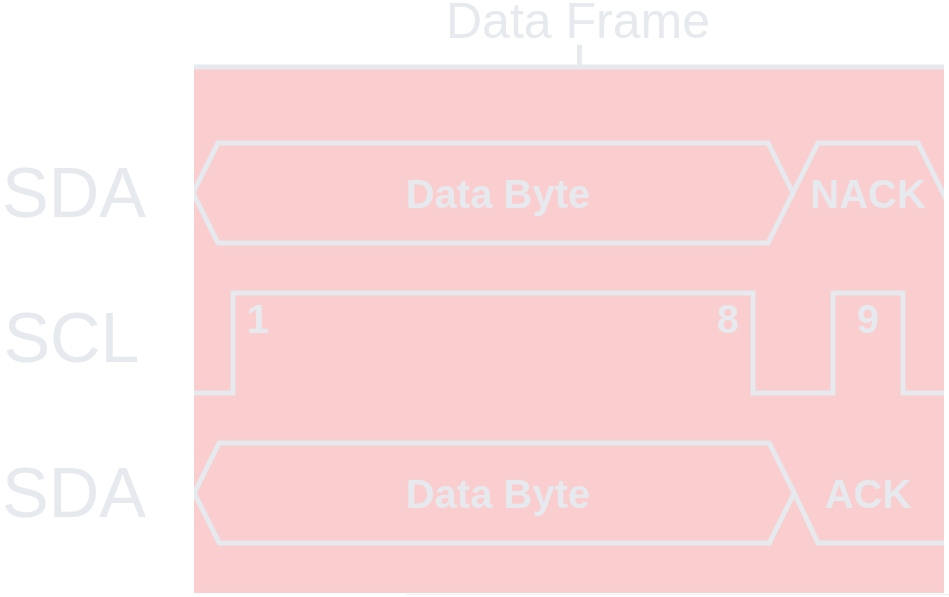
- The “Data Frame” contains the actual data payload of the I2C transaction.
- The first “Data Frame” in an I2C transaction always immediately follows the “Target Address Frame”.
Data Byte
- The “Data Byte” is 8 bits with MSB (Most Significant Bit) first and is the actual data payload.
- As previously discussed, the data is sent by whoever the sender is (controller or target depending on R/W bit).
- Note that the
ACK/NACKis set by the receiver but the “Data Byte” is set by the sender.
- Note that the
- These data bytes may be all data, but often one of them will indicate an internal address or register location in the target device.
- For example, if the controller wants to write a certain value to a specific register in the target, the data byte might be the address or location of that register and the second data byte would be the actual data that is to be written to that location.
- In many cases, multiple data bytes are sent in one I2C transaction.
- Additional bytes are simply concatenated onto the previous byte, with an
ACKbit separating them. This is illustrated better later.
- Additional bytes are simply concatenated onto the previous byte, with an
ACK/NACK Bit
- The 9th (last) bit in the “Data Frame” is the “
ACK/NACKBit”. - Set by the receiver in the transaction.
Transaction
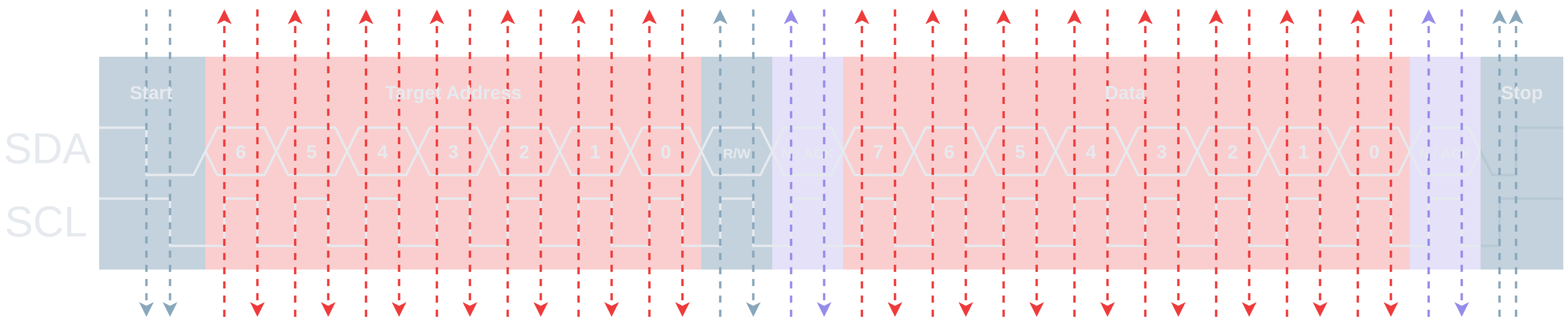
- This diagram illustrates an I2C transaction at a glance.
- A transaction always follows the same layout:
- Start Condition
- Target Address Frame
- Data Frame(s)
- Repeated Start (Optional)
- Stop Condition
Write

- This diagram specifically illustrates an I2C “Controller
WRITE” and depicts whether the controller or target has set a bit on the data lineSDA.
Multiple Writes
START | Target Addr. | W | ACK | Data Byte | ACK | … | Data Byte | ACK | STOP |
|---|
Note that in contrast to the “Multiple Reads”, in a string of
WRITEs, the target is the setter of theACK/NACKbit, and it does not terminate the string ofWRITEs with aNACK, it justACKs andSTOPs.
Code
#define MPU6050_ADDRESS 0x68
#define TICKS (1000 / portTICK_PERIOD_MS) // 1 Second

void write(uint8_t reg, uint8_t data) {
  i2c_cmd_handle_t cmd = i2c_cmd_link_create(); // Command Queue
  i2c_master_start(cmd); // Start Condition
  i2c_master_write_byte(cmd, (MPU6050_ADDRESS << 1) | I2C_MASTER_WRITE, true) // Target Address Frame w/ ack_en = true
  i2c_master_write_byte(cmd, reg, true); // Data Frame w/ ack_en = true
  i2c_master_write_byte(cmd, data, true); // Data Frame w/ ack_en = true
  i2c_master_stop(cmd); // Stop Condition
  i2c_master_cmd_begin(I2C_NUM_0, cmd, TICKS) // Execute Commands
  i2c_cmd_link_delete(cmd); // Free the memory allocated for Command Queue
}
Read

- This diagram specifically illustrates an I2C “Controller
READ” and depicts whether the controller or target has set a bit on the data lineSDA.
Multiple Reads
START | Target Addr. | R | ACK | Data Byte | ACK | … | Data Byte | ACK | Data Byte | NACK | STOP |
|---|
Note that in a string of
READs, the controller is the setter of theACK/NACKbit, and it terminates the string ofREADs with aNACK.
Code
#define MPU6050_ADDRESS 0x68
#define TICKS (1000 / portTICK_PERIOD_MS) // 1 Second

void read(uint8_t *buffer) {
  i2c_cmd_handle_t cmd = i2c_cmd_link_create(); // Command Queue
  i2c_master_start(cmd); // Start Condition
  i2c_master_write_byte(cmd, (MPU6050_ADDRESS << 1) | I2C_MASTER_READ, true); // Target Address Frame w/ ack_en = true
  i2c_master_read(cmd, buffer, 2, I2C_MASTER_LAST_NACK); // 2 Data Frames, ACK all but last which gets NACK
  i2c_master_stop(cmd); // Stop Condition
  i2c_master_cmd_begin(I2C_NUM_0, cmd, TICKS); // Execute Commands
  i2c_cmd_link_delete(cmd); // Free the memory allocated for Command Queue
}
Repeated Start
- Typically an I2C transaction is:
START→ Target Address → Data →STOP. - A “Repeated
START” is when the controller issues anotherSTARTat some point before it issues aSTOPand releasing the I2C bus. - A “Repeated
START” lets the controller switch what is is doing (change direction, change target, or both) without releasing the bus.- This is critical when bus release would let another controller modify state in between sub-transactions
- The most common use case is switching direction (Read/Write), but any scenario that needs atomicity across multiple sub-transactions can use it.
- “Repeated
START” allows the controller to maintain control over the bus without the risk of losing it to another controller if it instead had toSTOPand then try toSTARTagain. - “Repeated
START” lets you chain two transactions together atomically without ever releasing the I2C bus between them.
Example
- A classic example is read-from-register:
- From the target’s datasheet, we know what register on the target we are interested in reading data from.
- So we need to tell the target which register that is by writing the register address to the target’s internal register pointer (tell it where to read from).
- Then the target can read the data at that register address and tell us what is there such as sensor data.
- If you did
STOPthenSTARTbetween these, another controller could claim the I2C bus in the window between them and issue its own transaction to the same target.- That new transaction could write to the target’s internal register pointer, changing it to point a different register entirely.
- Then when the other controller reclaims the I2C bus and tries to do its
READphase, it would be reading from the wrong register without knowing it. - Repeated
STARTkeeps the whole operation atomic by never releasing the bus between the two phases.
Code
#define MPU6050_ADDRESS 0x68
#define MPU6050_ACCEL_XOUT_H 0x3B
#define TICKS (1000 / portTICK_PERIOD_MS) // 1 Second

void read_register(uint8_t reg, uint8_t *buffer, size_t len) {
  i2c_cmd_handle_t cmd = i2c_cmd_link_create(); // Command Queue
  // Write Phase - Tell the target which register to read from
  i2c_master_start(cmd); // Start Condition
  i2c_master_write_byte(cmd, (MPU6050_ADDRESS << 1) | I2C_MASTER_WRITE, true); // Target Address Frame w/ ack_en = true
  i2c_master_write_byte(cmd, reg, true); // Data Frame (Register Address) w/ ack_en = true
  // Read Phase - Repeated Start to switch direction
  i2c_master_start(cmd); // Repeated Start Condition
  i2c_master_write_byte(cmd, (MPU6050_ADDRESS << 1) | I2C_MASTER_READ, true); // Target Address Frame w/ ack_en = true
  i2c_master_read(cmd, buffer, len, I2C_MASTER_LAST_NACK); // len Data Frames, ACK all but last which gets NACK
  i2c_master_stop(cmd); // Stop Condition
  // Execute
  i2c_master_cmd_begin(I2C_NUM_0, cmd, TICKS); // Execute Commands
  i2c_cmd_link_delete(cmd); // Free the memory allocated for Command Queue
}

void app_main(void) {
  uint8_t raw[6]; // Buffer
  read_register(MPU6050_ACCEL_XOUT_H, raw, 6);
  int16_t ax = (raw[0] << 8 | raw[1]); // Accelerometer X
  int16_t ay = (raw[2] << 8 | raw[3]); // Accelerometer Y
  int16_t az = (raw[4] << 8 | raw[5]); // Accelerometer Z
}
Afterword
Hopefully these notes provide enough information and background to make reading the UM10204: I2C-Bus Specification & User Manual a bit more accessible! If I got anything wrong or there are any nuances I missed, I’m grateful if folks reach out to let me know at hello@rana-emaan.com. Thanks for reading!