It is 2 a.m. and I can’t sleep so I am writing about what I ended up doing the last time it was 2 a.m. and I couldn’t sleep: Rebooted my computer a lot.
Persona 3 Reload on Windows 11 Debloat
I recently decided I wanted to start playing Persona 3 Reload, so I went to my Steam library, as one does, to boot it up. Unfortunately, it wouldn’t start. The Steam [PLAY] button went through the steps visually up until it shows as a blue [STOP X] button, and then it just went back to being a green [PLAY] button. Wouldn’t even boot up the game window.
Microsoft Visual C++ Redistributable
I made sure to download both x64 and x86 Microsoft Visual C++ Redistributable and rebooted.
Updates
I updated Windows 11, AMD GPU, and AMD CPU and rebooted.
DirectX
I tried running the P3R.exe directly with “Run an administrator”. Upon doing so I actually got some error messages this time:
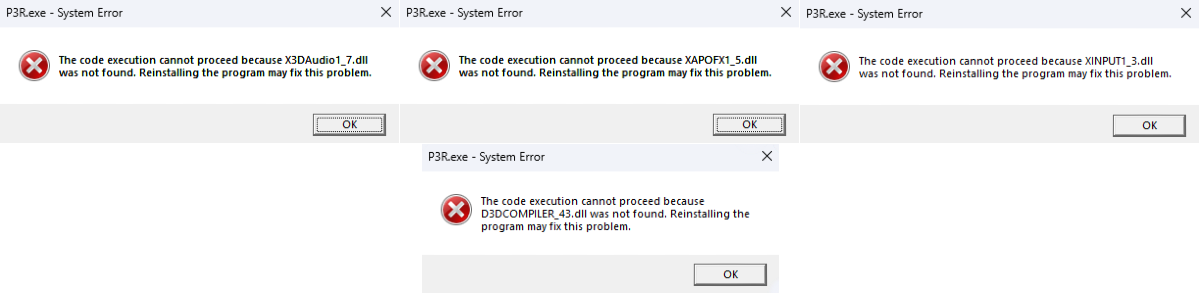
Turns out these were missing DLL’s from the legacy “DirectX End-User Runtime” package. I was missing these: XAPOFX1_5.dll, X3DAudio1_7.dll, XINPUT1_3.dll, D3DCOMPILER_43.dll. It turns out a lot of Japanese PC ports still rely on these runtime files from DirectX June 2010 ish. I went here: DirectX End-User Runtimes (June 2010) and downloaded it temporarily to a folder in my Downloads (there are A LOT of .cab files in the download). I did the following:
- Opened Command Prompt as Administrator
- Ran
sfc /scannow - Ran
DISM /Online /Cleanup-Image /RestoreHealth - Rebooted
- Delete any broken DirectX temp files at
C:\Windows\Tempand%TEMP%del /q /f /s "%TEMP%\*"for /d %x in ("%TEMP%\*") do @rd /s /q "%x"del /q /f /s "C:\Windows\Temp\*"for /d %x in ("C:\Windows\Temp\*") do @rd /s /q "%x"
- Extract the
.dlls needed from the.cabfiles and copy them intoC:\Windows\System32- Right-click the
.cabsuch asJun2010_D3DCompiler_43_x64.cab - Hover
7-Zipand selectOpen archive - Extract the
.dlls that are missing - Copy them into
C:\Windows\System32 - I ended up extracting and using these:
XAPOFX1_5.dll,D3DCompiler_43.dll,X3DAudio1_7.dll, andxinput1_3.dll
- Right-click the
- Rebooted
ResampleDmo
After rebooting I tried running P3R.exe as an administrator again after hitting the [PLAY] button in Steam yielded the same behavior as before. This time I got a different error (which is progress!):
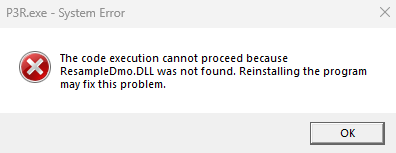
Turns out this is a standard Windows multimedia DLL that normally already exists in Windows. However… I ran this Windows 11 Debloat script when I installed Windows on my PC because I hate bloat. So I needed to download a fresh Windows 11 ISO to mount and grab the missing DLL from. I did the following:
DISM /Online /Cleanup-Image /StartComponentCleanup- Rebooted
- Downloaded Windows 11 ISO
- Right click the ISO and select
Mount - Open the mounted ISO and go to
sourcesfolder - Find and right-click
install.wim - Hover
7-Zipand selectOpen archive - Inside there are numbered folders, I checked
1and found theRESAMPLEDMO.dllfile and pulled it out - Copy
RESAMPLEDMO.dllintoC:\Windows\System32 - Rebooted
UnrealEngine
After rebooting I tried clicking on the [PLAY] button in Steam. This time the black screen for the game actually showed up and the program was in the bottom bar. The black screen was up for a few seconds before I got an UnrealEngine crash window and the game terminated.
There is a tool called Dependencies that is a dependency diagnosis tool. I did the following:
- Download
x64release - Open
P3R.exeinDependenciesprogram - Found alot of dependencies marked as missing but the ones that actually mattered were
MFPlat.dllandMF.dll
Media Foundation
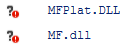
These are foundational Windows Media Foundation DLLs and so these were most likely what was causing the crash. In order to acquire these we repeat the same process we did to retrieve ResampleDmo.dll. I went ahead and retrieved all of these: MFPlat.dll, MF.dll, MFReadWrite.dll, mfcore.dll, and mfplay.dll. After finding them and moving them into C:\Windows\System32 I rebooted.
Full Moon Again, Crazy How Time Flies
After rebooting, I clicked on the [PLAY] button in Steam again and it worked! During this entire process I was sitting in my room hunched over my keyboard with the lights off so I felt like a gremlin. I was tired so I didn’t play the game but I did watch the Persona 3 Reload Opening Movie all the way through.
I’ve only played Persona 5 Royal and some of the original Shin Megami Tensei: Persona at this point. Persona games are not unproblematic unfortunately and there are a handful of things about the games that I really don’t like, but I try to ignore the parts that suck and appreciate the parts that are great (such as the music and main story).