Project repo: pop-the-led.
Pop The LED
Idea my friend pitched to me as a way to make blinking an LED with a button a bit more interesting/motivating. Essentially just a line of LEDs on a breadboard where:
- One LED called the
targetgets dimly lit at random. - There is a brightly lit
cursorthat is oscillating on the line of LEDs. - When the
cursoroverlaps with the dimly lit LED, you hit the button and get a point.
Intro
I’ve been trying to teach myself embedded so this is a blogpost about the first small embedded project I did. There was a lot I needed to review and learn to really feel like I understood what I was doing. Last year I tried to do some bare-metal programming on STM32 but didn’t get very far. I was watching a tutorial and didn’t know what a bus was exactly so I looked it up and then just had more questions the more I got into it. I wrote a big info-dump-markdown-notes-draft thing but didn’t finish it. I want to refine and post it sometime. I also did some breadboarding with a friend one day last year when we were hanging out so I had some background, but not a ton. Largely I felt like I was at a point where I had a vague impression of many of these things but not a concrete understanding and I wanted to fix that.
Process
These are the things I did as a part of the process for working on this, not strictly in this order, but roughly:
- Figure out the components I needed and why (like what resistor values do I need and why) and then bought anything I didn’t already have.
- Review and learn some of the concepts behind the electronics at play. I followed the first 8 chapters covered by these lectures: Basic Electronics with Joe Gryniuk. They are pretty old but the teaching style was enjoyable and clear.
- Reviewed the C programming language since I hadn’t really used it since undergrad ~3-4 years ago. I needed to clarify my understanding of pointers, memory, stack, heap, etc. Planning to post my notes on that too hopefully.
- Reviewed the specific ESP32 dev board I was using with a convenient reference1 I found, this YouTube video2, and the datasheet3.
- I also used LearnESP32 as a point of reference for introducing me to some of the kinds of things I could do and may want to do with the specific dev board I had. These were nice because it uses ESP IDF which uses FreeRTOS and I wanted to get practice with RTOS.
- Built out the project on the breadboard.
- Wrote the code for the project.
- Popped the LED!
Workflow
- Open terminal and run
. ~/esp/esp-idf/export.fishso you can useidf.py.- I use fish shell which is why I run the
.fishscript, this will be different for other shells.
- I use fish shell which is why I run the
- Run
idf.py create-project <project_name>.- Note that C identifiers don’t support hyphens and this command autogenerates a C file with the
<project_name>.cand uses it inCMakeLists.txt(you can always rename them).
- Note that C identifiers don’t support hyphens and this command autogenerates a C file with the
- Then run
idf.py set-target esp32to tell the build system which chip to compile for. - Use
sudo chmod 666 /dev/ttyUSB0to grant permissions for flashing for the terminal session. - Use
idf.py -p /dev/ttyUSB0 -b 115200 flash monitorwith the-b 115200optional to manage speed of operation if default doesn’t work.- Some cables or ports don’t handle the default chunk size well. Best results from plugging directly into the machine rather than a USB hub or something.
Dev Board
| Dev Board | DOIT ESP32 DevKit v1 |
|---|---|
| Model | ESP-WROOM-32 |
| Chip | ESP32-D0WD-V3 (revision v3.1) |
| Cores | 2 |
| RAM | 512 MB |
| Flash | 4 MB |
| Architecture | Xtensa |
I just listed the ones that I remember mattering for me when I was developing.
Pins
These are the pins I used:
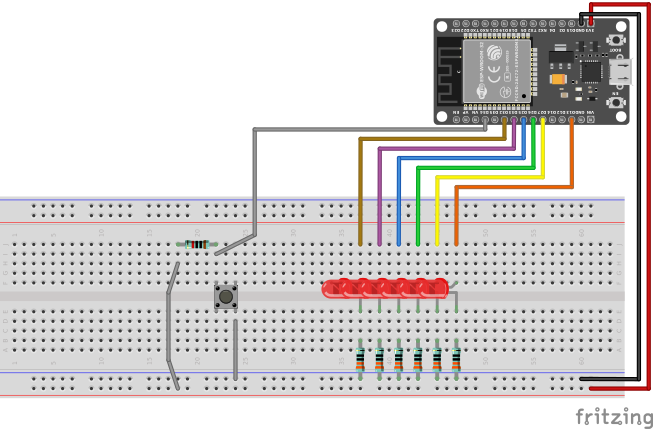
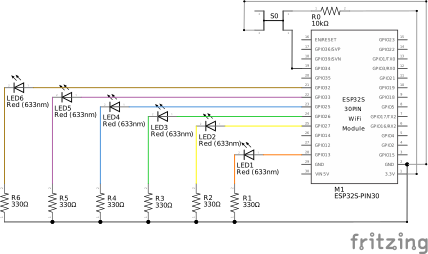
D13GPIO13- Orange Wire to LEDD27GPIO27- Yellow Wire to LEDD26GPIO26- Green Wire to LEDD25GPIO25- Blue Wire to LEDD33GPIO33- Violet Wire to LEDD32GPIO32- Ochre Wire to LEDD34GPIO34- Grey Wire to Button
Considerations
Some considerations I made when designing the project.
Input-Only Pins
GPIOs 34, 35, 36, and 39 on the ESP32 are input-only meaning they lack output drivers and internal pull-up/pull-down resistors. I assigned the button to GPIO34 for a few reasons:
- In my mind, the button was input only, so I might as well just wire it to an input-only pin. I figured it might also eliminate an opportunity for error (misconfiguring it as an output).
- This occurred to me later, but I imagine in larger projects it could be a good way to preserve the output-capable pins for components that need that capability.
It wasn’t an issue for me to just use an external resistor for the pull-down. I had already wired it that way before I realized the ESP32 had internal pull-up/pull-downs as an option.
Maximum Ratings
The ESP32 has both per-pin and per-power-domain current limits. For this specific project it turned out to not be an issue since I don’t use too many components or pins and in reality only 2 LEDs are ever on at any given time.
The ESP32 has GPIO pins that are split across three internal power domains:
VDD3P3_CPU- CPU and its peripherals.
VDD3P3_RTC- Always-on/deep-sleep.
VDD_SDIO- SPI flash interface.
Each of these are fed by its own VDD pin on the silicon. These 3 VDD pins are tied together externally and powered from the on-board 3.3V LDO regulator that converts USB-C 5V input to 3.3V for each power rail. The VIN, being 5V is fed by the USB-C’s 5V, typically through some component to prevent reverse current.
So the USB-C 5V is fed to VIN and the 3.3V LDO regulator which steps down the USB-C 5V to 3.3V for the VDD pins which then feeds to the aforementioned rails which each feed into different subsets of the GPIO pins on the dev board.
Per the ESP32 Datasheet, at maximum drive strength, a single pin can source up to 40 mA (CPU/RTC domains) or 20 mA (SDIO domain), and sink up to 28 mA. There is a footnote in the datasheet about how as more pins in the same domain source current simultaneously, the available per-pin current drops. So collective load on a particular power-domain is something to consider as well. Not a huge deal for this project but, good to be aware of.
For pop-the-led, I used a 330 Ω resistor per LED. Standard red LEDs have a forward voltage drop of roughly 2V so the resistor consumes 3.3V - 2V = 1.3V across it, giving a current of I = 1.3V / 330 Ω ≈ 4 mA per LED. This is around 10% of the per-pin maximum and 33% of the conservative 12 mA current that is a recommended guideline for sustained operation.
For projects that require larger amounts of current, it could be helpful to distribute components across the power-rails to manage the per-power-domain current loads.
Diagrams
Project diagrams.
Breadboard
Schematics
Demo
Coming soon…
BOM
Bill of Materials:
1xBreadboard1xDOIT ESP32 DevKit v16xRed LED1xLarge Tactile Button1xButton Capx6330 Ω Resistorsx110 kΩ Resistorx11Wires